Airmeet — Audio/video (A/V) diagnostic tool
A diagnostic tool for virtual events that reduced customer support tickets by 30% and increased attendance by 10%.
Industry:
B2B SaaS (Virtual events)
Role:
Sr. Product designer
Contribution:
Product design, research, prototyping, and usability testing
Overview
Overview
Airmeet is a B2B virtual events platform used by large enterprises. Audio/video (A/V) failures were the top risk: 56% of users hit mic, camera, or network issues, which increased drop-off and support load.
Airmeet is a B2B virtual events platform used by large enterprises. Audio/video (A/V) failures were the top risk: 56% of users hit mic, camera, or network issues, which increased drop-off and support load.
My role & process
My role & process
I led product design cross-collaborating with a product manager, engineering, support, and analytics. I owned information architecture, interaction design, prototyping, and usability testing.
I led product design cross-collaborating with a product manager, engineering, support, and analytics. I owned information architecture, interaction design, prototyping, and usability testing.
My process:
My process:
Engineering had built a 7-step diagnostic that took 2-3 minutes. Behavioral analytics and user testing revealed the flow was too slow, causing users to skip it and increasing support tickets.
Engineering had built a 7-step diagnostic that took 2-3 minutes. Behavioral analytics and user testing revealed the flow was too slow, causing users to skip it and increasing support tickets.
I redesigned the experience as a 1-click check that ran all tests simultaneously in 30 seconds. I also added contextual diagnostics at failure points during live events to catch issues in real-time.
I redesigned the experience as a 1-click check that ran all tests simultaneously in 30 seconds. I also added contextual diagnostics at failure points during live events to catch issues in real-time.
Challenge
Challenge
How might we help attendees, speakers, exhibitors, and organizers detect and fix A/V issues fast, before and during events, without adding friction?
How might we help attendees, speakers, exhibitors, and organizers detect and fix A/V issues fast, before and during events, without adding friction?
What we shipped
What we shipped
I designed and shipped two solutions: pre-event and during-event A/V diagnostics.
I designed and shipped two solutions: pre-event and during-event A/V diagnostics.
Solution 1
Solution 1
Pre-event check from the invite email
Pre-event check from the invite email
A new pre-event system check was introduced for attendees, organizers, speakers, and exhibitors.
Goals of this check:
Allow Attendees and Speakers to initiate a quick pre-event system A/V check directly from the email without entering the event.
Enable Exhibitors to initiate a pre-event system check from the email when setting up their booth.
Provide a simple, self-serve troubleshooting process to reduce the users’ anxiety.
Goals of this check:
Allow Attendees and Speakers to initiate a quick pre-event system A/V check directly from the email without entering the event.
Enable Exhibitors to initiate a pre-event system check from the email when setting up their booth.
Provide a simple, self-serve troubleshooting process to reduce the users’ anxiety.
Version 1: 7-step A/V diagnostic flow
comprehensive but slow (2-3 minutes)
Version 1: 7-step A/V diagnostic flow
comprehensive but slow (2-3 minutes)
Version 1 was a proof-of-concept created by the engineering team — a 7-step guided flow. I was bought onboard to improve it's overall user experience.
Version 1 was a proof-of-concept created by the engineering team — a 7-step guided flow. I was bought onboard to improve it's overall user experience.
Insight
The best diagnostic is the one users complete.
Internal testing revealed that the 7-step flow had too many clicks and felt time-consuming.
Insight
The best diagnostic is the one users complete.
Internal testing revealed that the 7-step flow had too many clicks and felt time-consuming.
Action
I validated feasibility with engineers to run all checks simultaneously. After aligning stakeholders through video walkthroughs and reviews, I redesigned the flow.
Action
I validated feasibility with engineers to run all checks simultaneously. After aligning stakeholders through video walkthroughs and reviews, I redesigned the flow.
Version 2: 1-click A/V diagnostic flow
Version 2: 1-click A/V diagnostic flow
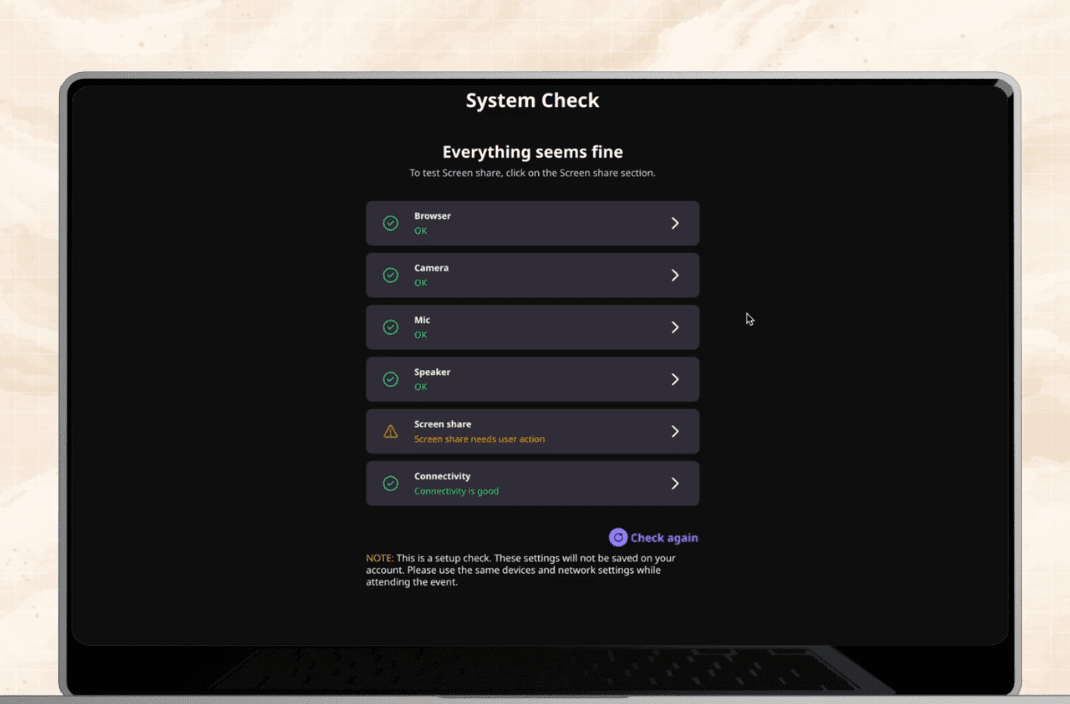
Version 2 is a 1-click diagnostic that completed all checks in ~30 seconds (down from 2-3 minutes).
Version 2 is a 1-click diagnostic that completed all checks in ~30 seconds (down from 2-3 minutes).
Version 1: 7-step A/V diagnostic flow — Email CTA → Run 7-step check (Browser, Mic/Camera, Speaker, Screen Share, Connectivity) → Pass/fail report
Version 2: 1-click A/V diagnostic flow — Email CTA → Run all checks simultaneously
→ Pass/fail report
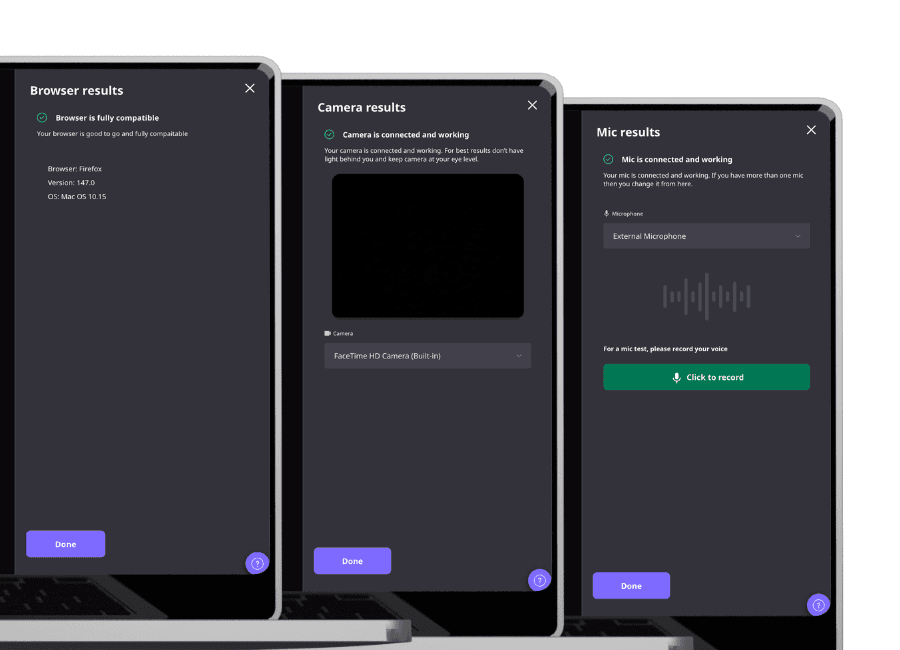
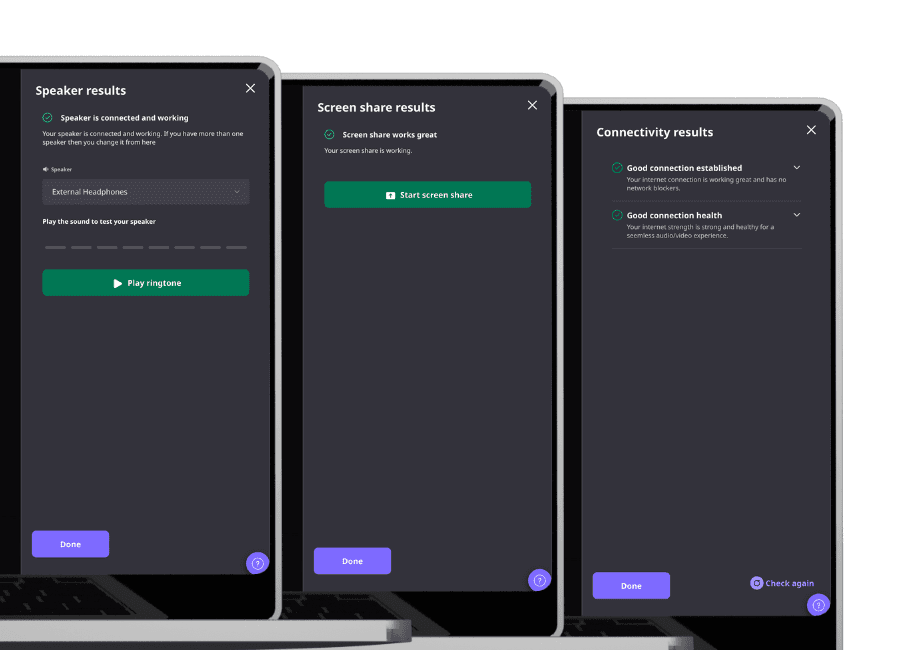
All check results screen (i.e browser, mic/camera, speaker, screen share, connectivity)
Solution 2
Solution 2
During-event checks inside key areas
During-event checks inside key areas
I added automated diagnostics at critical event entry points for all user types (i.e. organizers, attendees, speakers and exhibitors).
I added automated diagnostics at critical event entry points for all user types (i.e. organizers, attendees, speakers and exhibitors).
Goals of this check:
Run automated background checks for firewall or camera blockers at login
Provide self-service diagnostics during live events to reduce user stress and anxiety
Goals of this check:
Run automated background checks for firewall or camera blockers at login
Provide self-service diagnostics during live events to reduce user stress and anxiety
Implementation
I added diagnostics at failure points. A contextual diagnostic button triggers an automatic scan.
Implementation
I added diagnostics at failure points. A contextual diagnostic button triggers an automatic scan.
During-event system:
Permissions (mic/camera) -> Device selection and validation → Network/firewall connectivity → Contextual retry and troubleshooting
During-event system:
Permissions (mic/camera) -> Device selection and validation → Network/firewall connectivity → Contextual retry and troubleshooting
First implementation at event login
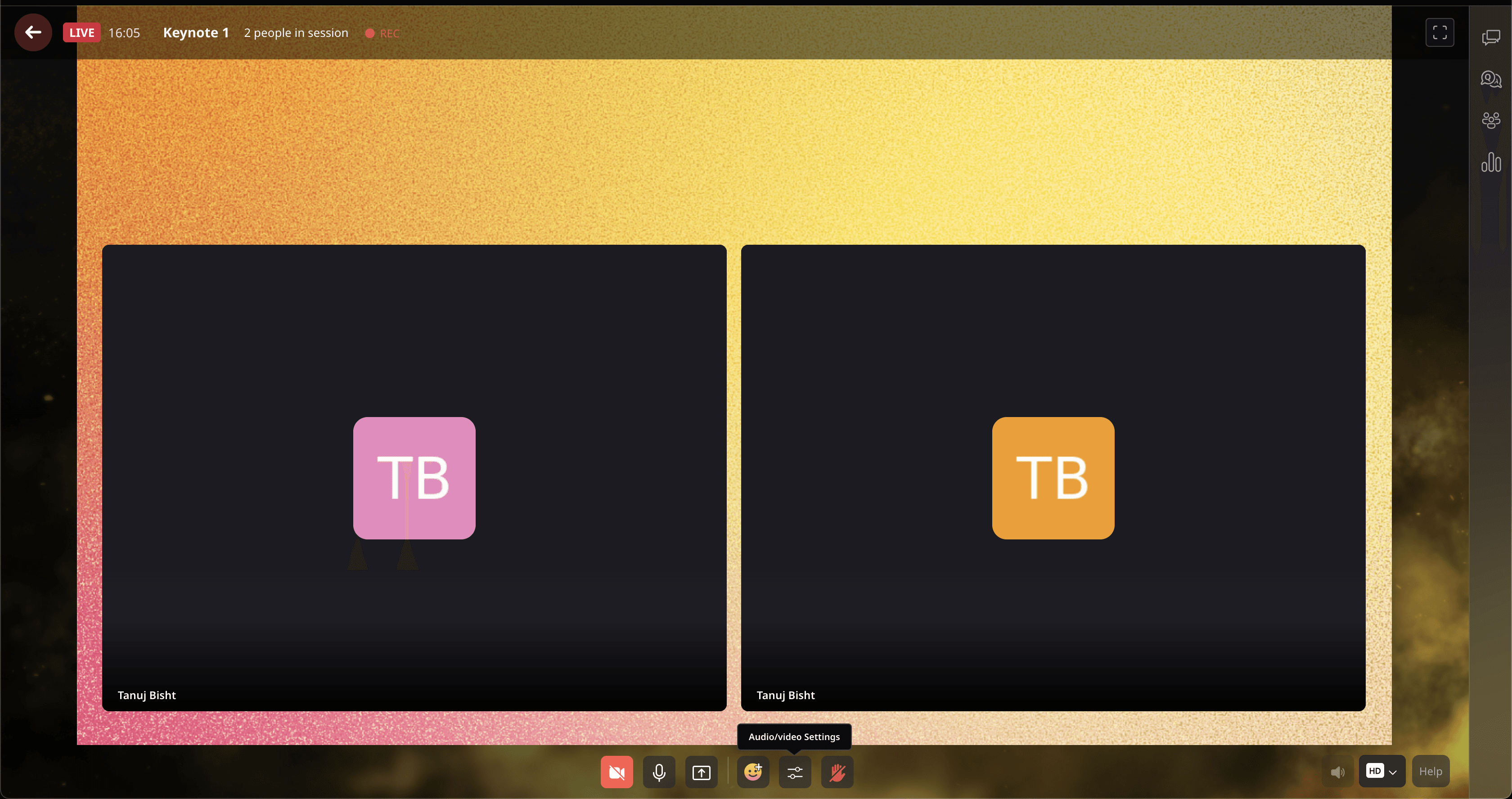
Second implementation at main stage
Third implementation at speed networking
Fourth implementation at lounge and booth area
Impact
Impact
30% fewer
customer support tickets
30% fewer
customer support tickets
10% increase
in event attendance
10% increase
in event attendance
10% increase
in event attendance
Learnings
Learnings
Validate before scaling
Ship, instrument, refine
Validate before scaling
Ship, instrument, refine
Validate before scaling
Ship, instrument, refine
Design for stress
Error states need calming copy and clear next steps.
Design for stress
Error states need calming copy and clear next steps.
Journeys beat screens
A/V reliability requires coverage across entry points, not one modal
Journeys beat screens
A/V reliability requires coverage across entry points, not one modal
Journeys beat screens
A/V reliability requires coverage across entry points, not one modal
Airmeet — Audio/video (A/V) diagnostic tool
A diagnostic tool for virtual events that reduced customer support tickets by 30% and increased attendance by 10%.
Industry:
B2B SaaS (Virtual events)
Role:
Sr. Product designer
Contribution:
Product design, research, prototyping, and usability testing
Airmeet_case_study.exe
Contact:
@2026 Tanuj Bisht • Designed & developed in Framer with ❤️ by me
@2026 Tanuj Bisht • Designed & developed in Framer with ❤️ by me